 Portfolio of Keith Elder
Hacking Your Schedule To Stay Productive
by Keith Elder

It is no secret that as leaders our calendars are often full of meetings. Juggling one-on-ones, team meetings, and even required leadership meetings can be stressful. At times, it can be difficult to know what to do when you have a lot of meetings coming up. Especially when you are a new leader or team member at the Rocket FOC. I was recently asked to help a new leader with managing their calendar. Here are the tips I came up with from that conversation that might help you stay productive and get things done.
Batching

Borrowing from a productivity tip of mine, it is important to batch similar items together. Batching is the process of taking your meetings and putting them back to back to back in order to create larger blocks of time later to focus.
For example, it is better to book two or three meetings together, rather than:
- have a meeting
- wait thirty minutes
- have another meeting
- wait thirty minutes
- have another meeting
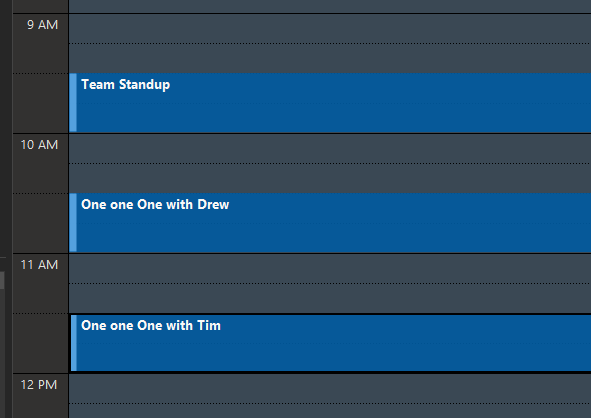
Batching meetings and even things you need to get done helps create focus for later. For example, one-on-ones or team ceremonies. Here are two examples using one-on-ones.
Bad Example:
Good Example:
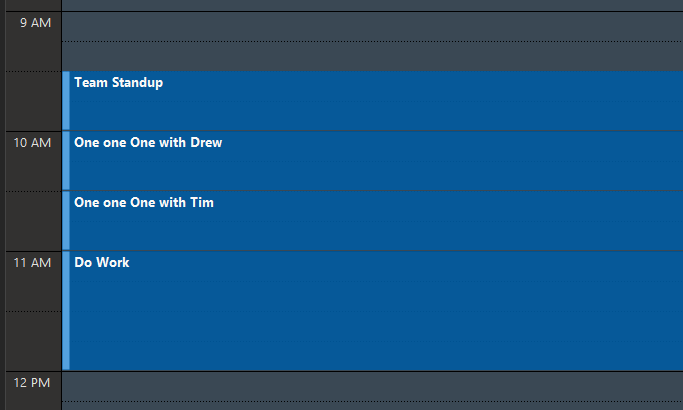
As you see from the good example, because batching was applied, the leader has a larger block of time to focus. An hour compared to two thirty minute time blocks. This is important on many levels because larger blocks of time are more productive and lead to flow.
Color Code Meetings
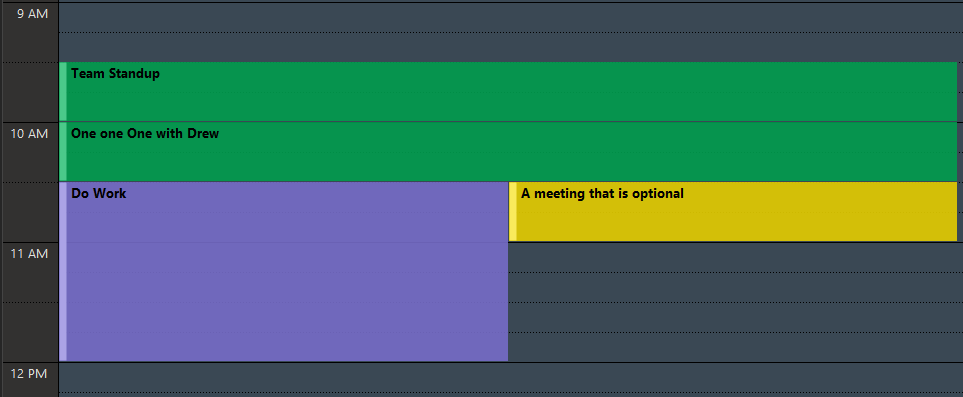
A great way to know where you need to be when is to color code your meetings. This will help at a glance to know which meetings are important and which ones are not. If a meeting is reoccurring, once it is color coded, the selected color is applied to all of the meetings in the series. Here's the color codes I use:
- Green - important, I need to go
- Yellow - optional, I might go or not, or it is on my calendar as an FYI (office hours of other teams for example)
- Red - protect at all cost (coordially required meetings, Dr visits, etc)
- Purple - me time to get things done
- Blue - optional meeting but I should make an effort to go
Example:
Batching with a Buffer
It seems to be human nature to want to start meetings at zero minutes or thirty minutes after. It feels nice and clean. The reality is a meeting can start whenever we want and we can use this to our advantage. Especially on longer meetings to help out those onsite struggling to get from room to room or even building to building.
For longer meetings I prefer to schedule them to start at five minutes after the hour or thirty-five minute mark and then end five minutes early. This gives everyone a chance to finish up their notes, bio breaks and glance at the agenda for the next meeting.
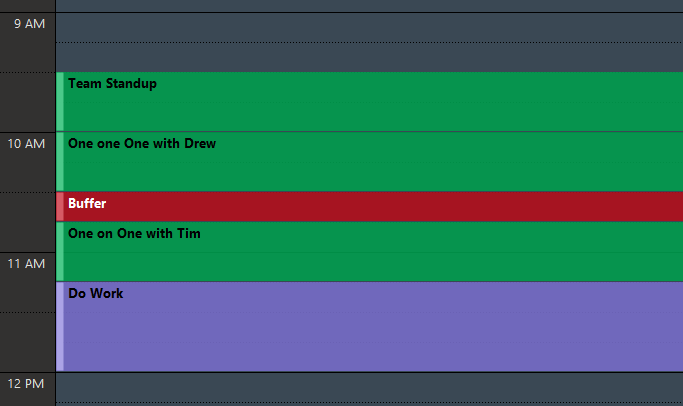
Previously I talked about batching and used the example of one-one-ones back to back. However, this is one of those exceptions where I feel you need to always have a buffer built in. More times than not, a one-on-one will run over with team members and it is best to not have to cut the great conversation off in mid-stream. Due to scheduling constraints this isn't always achievable but here's an example of batching with a buffer.
Example:
Blocking - Create You Time
I've found that if you have a free moment to actually get work done, someone can quickly find a way to fill it in on your calendar. One way to counter this is to create a reoccurring calendar entry for yourself to block your own time. This is time for you to get actual work done. It is important to get this on the calendar early so it has time to bake into your calendar. It may take a few weeks to finally not have meetings scheduled over it.
Tip #1: Setting this time as "out of office" will in some cases deter some team members from scheduling over this time.
Tip #2: Setting the name to something that sounds important rather than "me time" will also help deter others from scheduling over this time.
Delegate Meetings

As leaders we feel like we must attend every meeting. However, that doesn't help others on the team grow. It isn't stated anywhere, but leaders do not have to attend every single meeting. Instead, they can use some of their meetings as a way to give team members more responsibility or take a lead role. This is a great way to help others grow and to give yourself time back for more important or pressing matters.
Meetings With No Agenda

If you receive a meeting with no agenda, it is perfectly fine to get clarity on the purpose of the meeting. Meetings are costly so it is important to know in advance the value you will get from that time. Some companies require full written documents before hand to call a meeting because meetings are typically so counterproductive. After receiving an agenda, make the call whether you will attend.
Recap
Juggling a busy work schedule isn't easy. I've been hacking my calendar for almost eighteen years. The three main things I try to do are:
- Batching (group things together)
- Blocking (save time for me)
- Buffering (build in time between)
My goal is to help our team find focus and productivity in the long run. I hope these tips help you to get the most out of your schedule.